As mentioned in the previous section, there are two modes in which the remote can be operated.
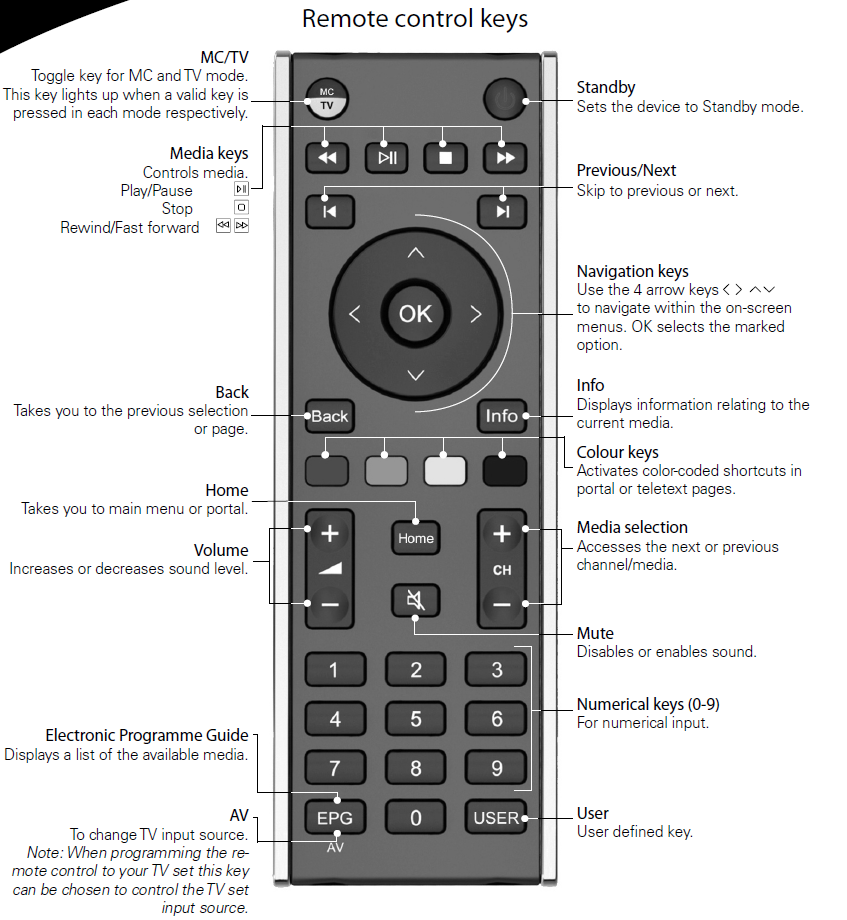
On the remote keys side of the unit, we have a MC/TV toggle key on the top left corner.
To determine which mode the remote is currently in, any key can be pressed.
The MC/TV toggle key lights up in red when in RF mode.
The toggle key can itself be pressed to change the mode.
When the toggle key lights up in green, any key press is considered to be in the IR mode.
Operation in the RF mode is as straightforward as using a wireless keyboard or mouse with the PC. After plugging in the RF receiver, Windows automatically updated the necessary drivers.
The remote keys side is optimized for the XBMC experience. As the key definitions above show, all the features necessary for navigating through XBMC are appropriately mapped.
On some XBMC screens, it is necessary to enter text through a keyboard. Though this is not a frequent necessity, the remote handles it easily.
Just flipping over the unit automatically brings up the text entry sub-window within XBMC. The orientation / tilt sensor at work here is unfortunately very sensitive.
In the course of using the remote, I had the text entry box in XBMC fire up at unexpected times due to slight changes in how I was holding the remote.
Of course, as I spent more time with the remote, I learned to avoid such movements, but it is something the user needs to put up with in the initial stages.
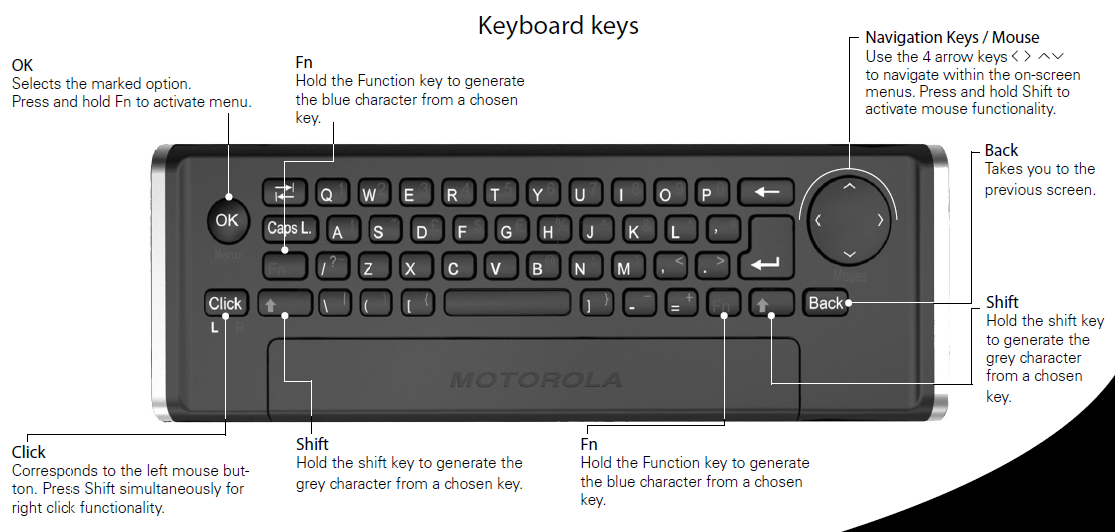
If the remote is used in RF mode with Firefox as the active window, any sideways movement of the remote triggers a 'Caret Browsing' dialog box.
Pulse-Eight indicated that the flip action was bound to F7 and Ctrl+F7 with no way to turn it off. Outside of XBMC those keys get interpreted as a standard keyboard press.
In Firefox F7 happens to enable caret browsing.
When Pulse-Eight developed the remote, they wanted a signal to know which way up the remote was but keeping within the realms of a HID device, F7 was the most unused key they could find for general operation and WMC/XBMC/MythTV etc
In the RF mode, I was able to get the key presses recognized from as far back as 40 ft. from the PC. Of course, there is no line of sight necessary.
For usage in the IR mode, the remote needs to be programmed. It is quite possible that users want to start over in the middle of programming the keys.
So, the first thing we checked for was the ability to wipe out the existing programming and restore the remote to factory settings.
This was achieved by holding the MC/TV key pressed for 10 seconds.
The key began to flash red and green alternately, and the factory reset was confirmed by pressing the OK key. The MC/TV key flashed in green thrice to confirm the factory reset.
All keys on the remote keys side are programmable (except for the MC/TV key obviously) and available in the IR mode.
Programming was done by first ensuring that the remote was in the TV mode (any key press would make the MC/TV key light up in green).
To enter into the programming mode, the MC/TV key was pressed for 3 seconds. The key turned a solid green. The NYXboard and the remote to be learnt from were placed head to head.
The key to be learnt from the original remote was pressed.
The MC/TV key turned red to indicate that a signal had been received and registered.
The corresponding NYXboard key was pressed, and the MC/TV key turned green to indicate that the registered IR code was transferred to that particular key.
The process was repeated with the rest of the keys on the original remote.
After the programming, the OK key was pressed to exit the learning mode.
There is nothing preventing the user from mapping multiple remotes to the NYXboard.
It just needs to be noted that a particular key can be mapped to a key from one remote only.
For the purpose of our review, we programmed the keys of a Sony KDL46EX720 remote into the NYXboard.
The programming worked fine and we were able to get the TV operated using the NYXboard alone.
However, the horizontal angle of operation of the IR remote was much worse than the original Sony remote.
The operating range is much shorter. With 6 month old AAA batteries, the Sony remote was able to operate even when 30 ft.
away from the TV. With the NYXboard, we weren't able to go beyond 18 ft.
even with fresh batteries. On the whole, the IR mode experience is passable.
Though the operating range and angles are a bit of a downer, the ability to get rid of multiple remotes (as long as one has CEC in the setup -- even if the HTPC is not CEC enabled) is a welcome addition. In our testbed, the Sony TV was connected to a Pioneer Elite VSX-32 through an ARC-enabled (Audio Return Channel) HDMI link.
Combining this with the CEC functionality, we were able to control the AVR's volume with the NYXboard remote.
